

すっかり CoreData の使い方を忘れていたので、最初から。
NSPersistentContainer, sqlite ファイルの配置指定など
Xcode で CoreData を使う旨の指定をしてプロジェクトを生成すると NSPersistentContainer はできている。
具体的には
@synthesize persistentContainer = _persistentContainer;

- (NSPersistentContainer *)persistentContainer {
    // The persistent container for the application. This implementation creates and returns a container, having loaded the store for the application to it.
    @synchronized (self) {
        if (_persistentContainer == nil) {
            _persistentContainer = [[NSPersistentContainer alloc] initWithName:@"CoreData2"];
といったコードが、AppDelegate.m に自動生成されている。
では、これを単純にビルド→ランさせただけで CoreData2.sqlite ができるかというとそうはならないようだ。
検証の必要はあるが、Display Name = CoreData2 と指定しないと sqlite ファイルを作成しないようだ。
また、sqlite ファイルのコンテナ領域の中の Application Support フォルダの中である。
ややこしい。。。
ところで、これ、置き場所を変えられないものなんだろうか?
結果から言うとできるっぽい。
上の記事にあるようにハンドラを呼び出す前に、URL を改変して指定する。
_persistentContainer = [[NSPersistentContainer alloc] initWithName:@"AppName"];
NSPersistentStoreDescription *storeDescription = _persistentContainer.persistentStoreDescriptions.firstObject;
NSURL *URL = [storeDescription.URL.URLByDeletingLastPathComponent URLByAppendingPathComponent:@"NewLocation.sqlite"];
storeDescription.URL = URL;
[_persistentContainer loadPersistentStoresWithCompletionHandler:^(NSPersistentStoreDescription *storeDescription, NSError *error) {
OneToOne の一方向の関係性
というようなものもつくれるが、需要はなさそう。
AppDelegate.m
- (void)applicationDidFinishLaunching:(NSNotification *)aNotification {
    _persistentContainer = [self persistentContainer];

    NSManagedObjectContext *context = _persistentContainer.viewContext;
    Child *child = [NSEntityDescription insertNewObjectForEntityForName:@"Child"
                                                       inManagedObjectContext:context];
    child.name = @"taro";
    Child *child2 = [NSEntityDescription insertNewObjectForEntityForName:@"Child"
                                                       inManagedObjectContext:context];
    child2.name = @"hanako";
    Person *person = [NSEntityDescription insertNewObjectForEntityForName:@"Person"
                                                       inManagedObjectContext:context];
    person.name = @"yamada";
    person.children = child;
    NSError *error = nil;
    [context save:&error];
結果。
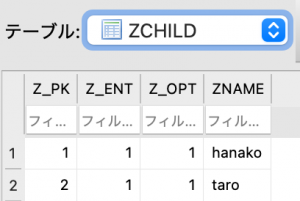
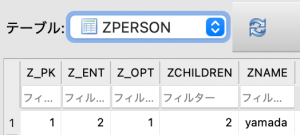
(続く)